

Production and performance
Automated counting
A camera over the belt counts pieces and logs when product stops flowing.
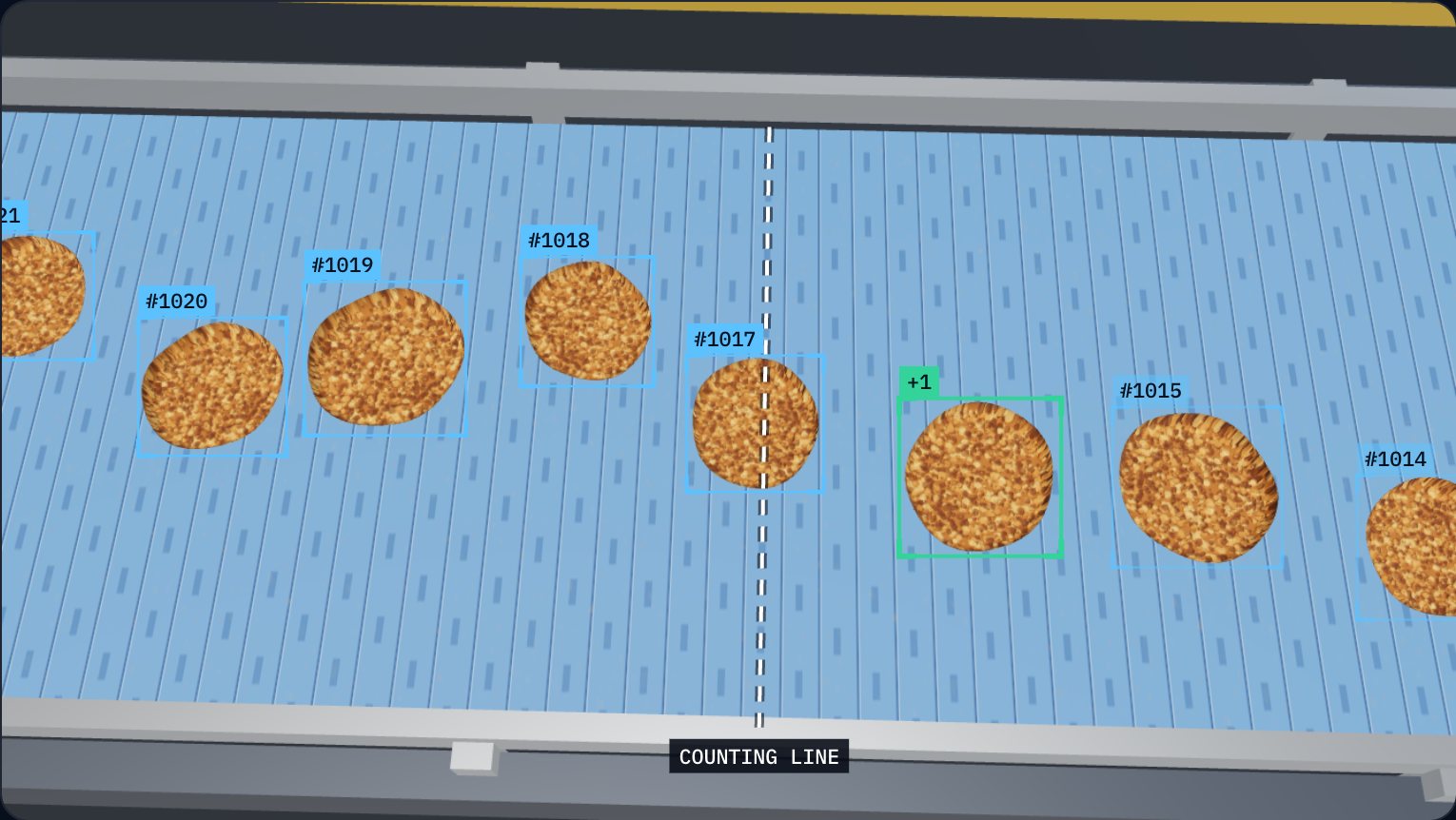
- 01 Detects each piece
- 02 Tracks it with an ID
- 03 Counts on crossing
The problem
Hand counting is slow, costly and rarely adds up
An over- or under-filled case is caught late: at the scale, at the customer or in a complaint. Fixing it often means reopening, recounting and repacking.
Being validated on the plant floor
Sound familiar?
- Cases or bags with too many or too few units.
- People counting instead of producing.
- Production and inventory counts don't match.
- Product given away because nobody knows how much went in.
How we approach it
We install a camera where the count matters. A computer vision model tracks each piece, counts it as it crosses a virtual line, and sends only counts and events, not video.
1. We film your product
Real footage of the belt: speed, spacing, lighting and overlapping pieces.
2. We train and test the model
Its count is checked against manual counts on clips it hasn't seen.
3. We process at the line
An edge computer beside the line analyzes the video; only counts and events are uploaded.
4. We tie the count to the order
Every count is linked to the line, product and order being run.
What it takes
Software
- Detection and tracking model trained on your product
- Count and event log by line
- Count view in the production dashboard
Plant equipment
- Industrial camera with a lens suited to the distance and belt width
- Controlled lighting where plant light varies
- Edge computer next to the line
- Enclosure, mount, PoE switch and backup power (UPS)
Camera, lens and lighting are chosen for the product, belt and environment (cold, humidity, washdown); final setup is defined during technical design.
Who uses it and what they decide
- Packaging operator
- Sees the count for the current case or batch.
- Line supervisor
- Spots when the rate drops or product stops flowing.
- Inventory and shipping
- Gets a produced quantity that matches what was packed.
Decisions it supports
- 01Stop or adjust filling before completing off-count cases.
- 02Reassign people who count by hand today.
- 03Investigate a shift or product where the count doesn't add up.
How value is measured
We measure before and after, on your line. Value is shown with your data.
- Gap between manual and automatic counts
- Counted side by side during validation, over the same periods.
- Cases reopened or repacked due to count errors
- Logged before and after installation.
- Hours spent hand counting
- Compared per shift, before and after.
Connects with
Counting is the foundation: when product stops, a stop is logged, and if it passes your threshold, the owner is alerted.
Let's start with one problem.
Tell us what's costing you most today. We'll review it with you, show how we'd solve it and estimate its value together.